Borrowing and Lending Tools with ToolWorks
Complete Peer-to-Peer Tool Transfers and Chain of Custody
Start Tracking NowTrack Borrowed Tools, Employee Transfers, and Warehouse Assignments with Complete Accountability
Keeping tools and equipment moving efficiently between employees is one of the biggest challenges for construction companies, contractors, utilities, maintenance teams, manufacturing facilities, and field service organizations. Workers constantly need to borrow specialized tools from coworkers, supervisors need to assign equipment from the warehouse, and managers need to know exactly who is responsible for every asset at any given time.
Many organizations evaluating tool tracking software discover ShareMyToolBox because of its peer-to-peer tool transfer workflow. A common question they ask is:
Can ToolWorks support the same borrowing and lending workflows?
The answer is yes.
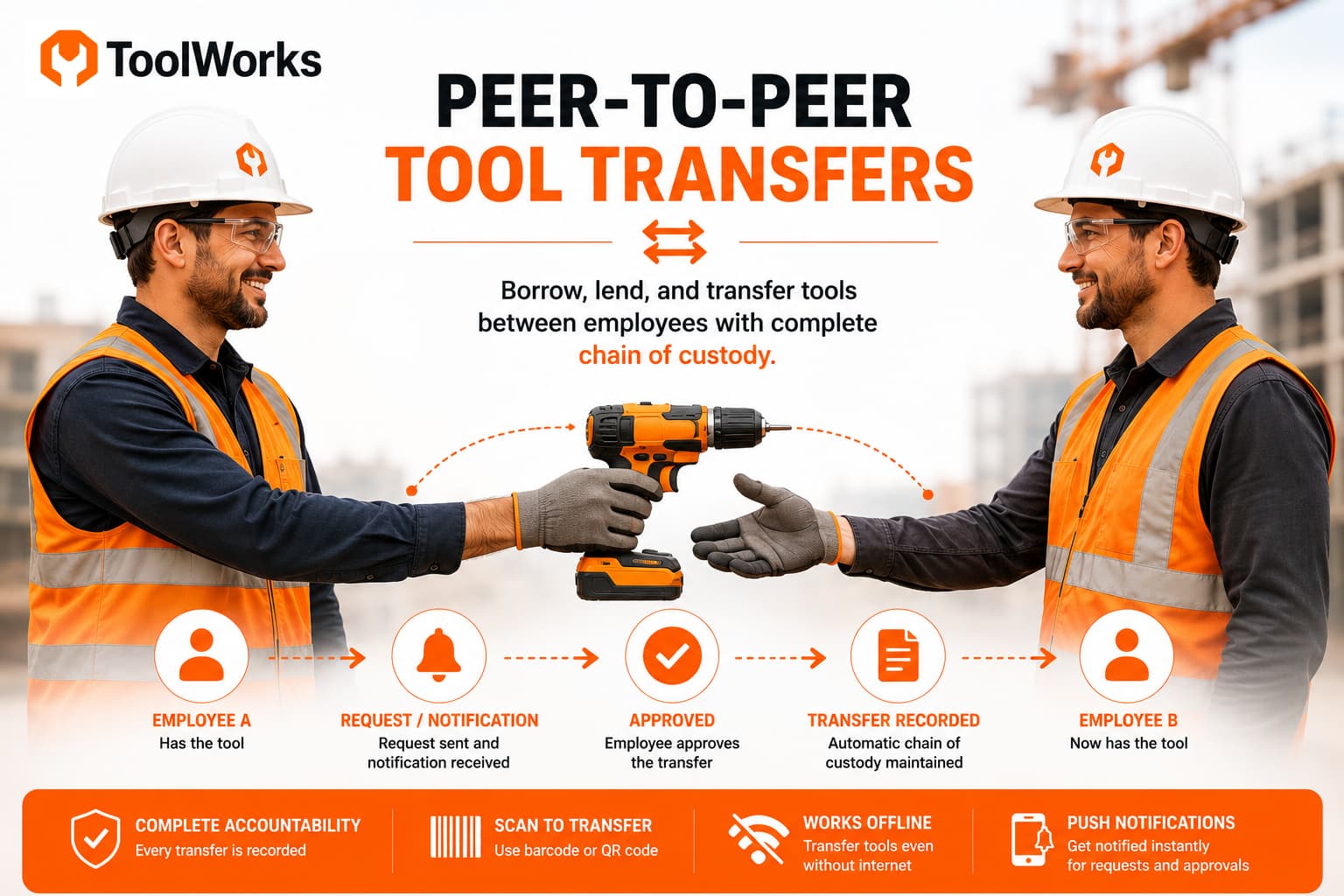
ToolWorks supports peer-to-peer tool requests, employee-to-employee transfers, warehouse assignments, and complete chain of custody tracking, all from a single platform. Whether a worker needs to borrow a torque wrench from a coworker, receive equipment from the warehouse, or transfer tools while working in the field without an internet connection, ToolWorks provides a simple, accountable workflow that keeps every transfer recorded.
In this guide, we'll explore how ToolWorks helps organizations manage tool borrowing, lending, assignments, and transfers while maintaining a complete history of every handoff.
Why Peer-to-Peer Tool Transfers Matter
Most companies do not operate from a single warehouse where every tool is checked in and out throughout the day.
Instead, tools are constantly moving between people.
A technician might need to borrow a thermal camera for an afternoon.
A supervisor may transfer a laser level to another crew.
An electrician might lend a specialty crimping tool to another employee working nearby.
Without a structured transfer process, several problems quickly arise:
- Nobody knows who currently has the tool.
- Responsibility becomes unclear.
- Transfers happen verbally and are never recorded.
- Lost tools become difficult to investigate.
- Employees waste time searching for equipment.
Digital peer-to-peer transfers solve these challenges by recording every movement while allowing employees to continue working without unnecessary trips back to the warehouse.
More Than Peer-to-Peer Transfers
While peer-to-peer borrowing is an important workflow, most organizations need much more than that.
A typical day may involve:
- Assigning tools from the warehouse to employees.
- Employees requesting tools from coworkers.
- Employees transferring equipment directly in the field.
- Returning tools back to the warehouse.
- Moving equipment between job sites.
- Tracking heavy equipment, test instruments, PPE, ladders, and other assets alongside tools.
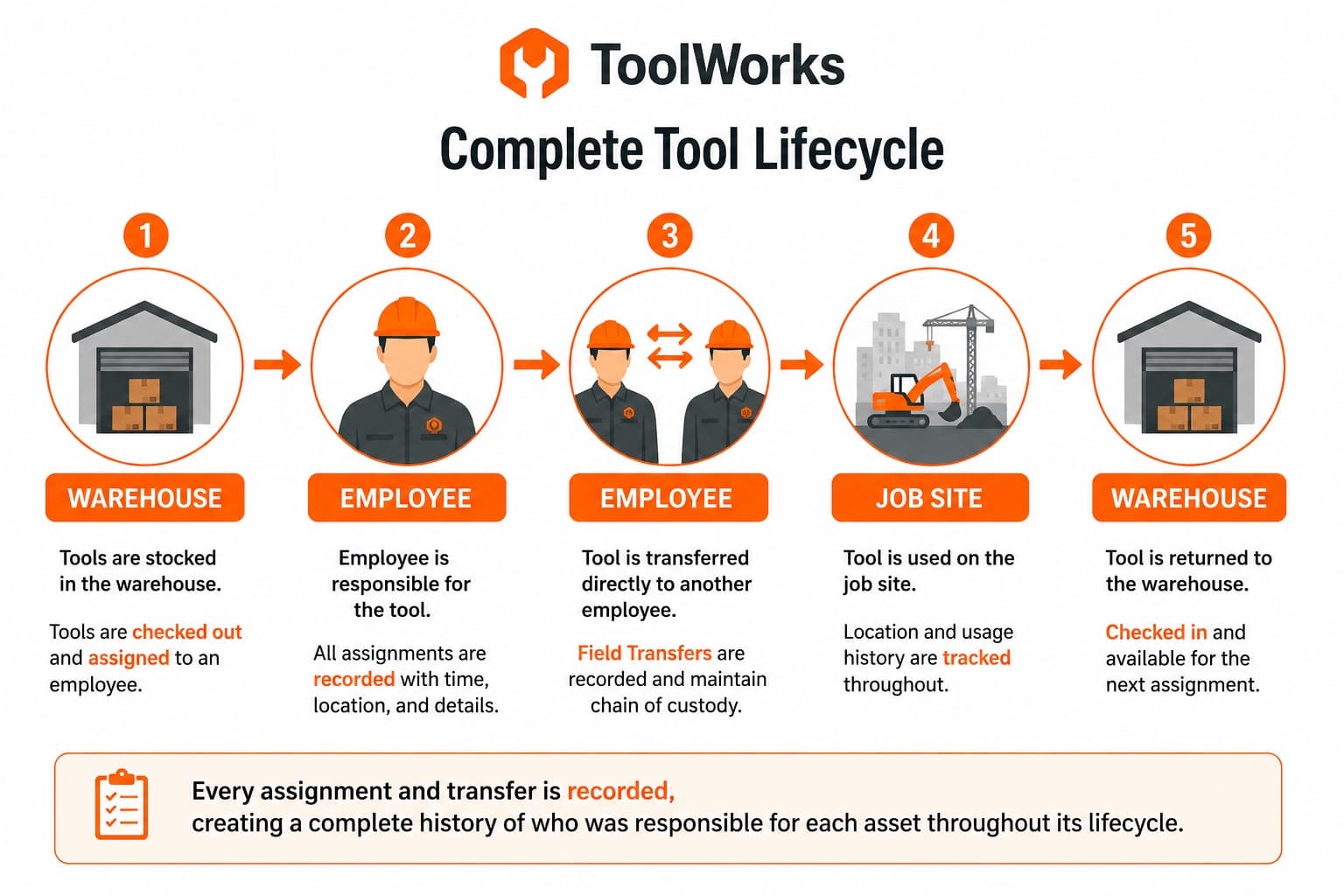
Rather than treating these as separate processes, ToolWorks manages them using a consistent chain of custody that records every movement automatically.
Every assignment and transfer is recorded, creating a complete history of who was responsible for each asset throughout its lifecycle.
Assigning Tools from the Warehouse
The first step in most organizations is assigning tools from a warehouse or tool room to an employee.
In ToolWorks, this workflow is called Tool Assignment.
A warehouse manager simply selects the employee, scans the tools being issued, and completes the assignment.
If your organization requires additional accountability, employee confirmation can be enabled.
The receiving employee can accept or decline the assignment, creating a verifiable chain of custody before responsibility changes hands.
This process helps organizations:
- Reduce disputes over issued equipment.
- Confirm employees received the correct tools.
- Maintain accurate responsibility records.
- Improve compliance with internal asset policies.
Unlike paper sign-out sheets, every assignment is permanently recorded with:
- Date and time
- Employee
- Warehouse or location
- Notes
- Photos
- Signatures
- Confirmation status
This provides a detailed audit trail without adding extra work for warehouse personnel.
Borrowing Tools from Another Employee
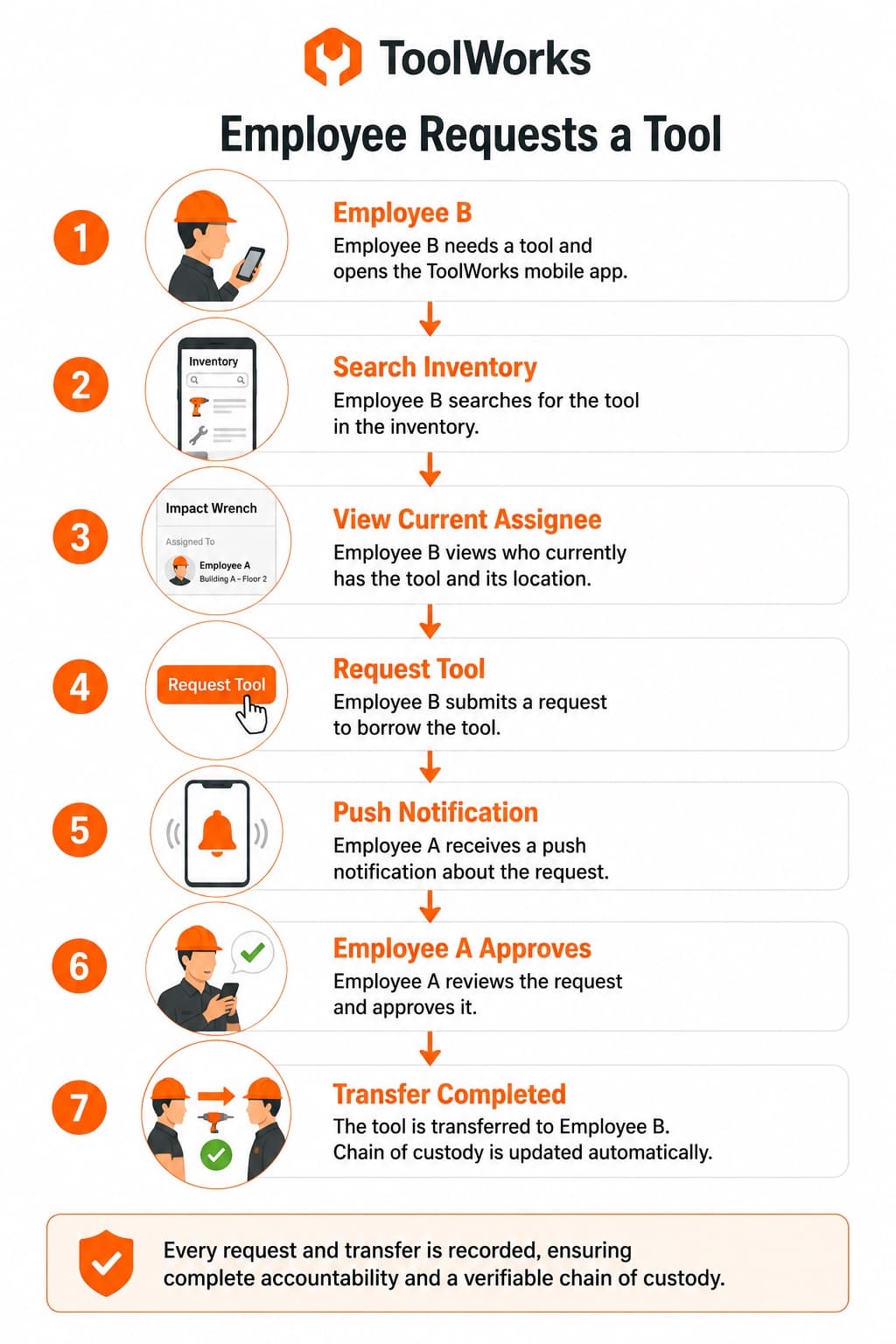
One of the most common field scenarios occurs when an employee needs a tool that is currently assigned to someone else.
Instead of making phone calls or searching the job site, employees can simply search ToolWorks.
The inventory screen shows:
- Who currently has the tool.
- Current location.
- Assignment status.
- Expected return information, when available.
If the tool is available, the employee submits a Field Transfer Request.
The current holder receives a push notification requesting approval.
If approved, the requesting employee collects the tool, and ToolWorks records the transfer automatically.
This workflow minimizes interruptions while ensuring every borrowed tool remains fully traceable.
Direct Employee-to-Employee Transfers
Sometimes there is no need for a request.
Imagine two technicians working together on the same site.
One walks over and asks,
"Can I borrow your inspection camera?"
The current holder agrees.
Instead of relying on memory, the employee initiates a Field Transfer directly within ToolWorks.
The receiving employee simply accepts or declines the transfer.
Once accepted, responsibility changes immediately.
The process takes only a few seconds while preserving complete accountability.
This simple workflow encourages employees to record transfers because it is easier than trying to remember who borrowed what later.
More Than Just Changing the Assignee
One of the biggest advantages of ToolWorks is what happens behind the scenes.
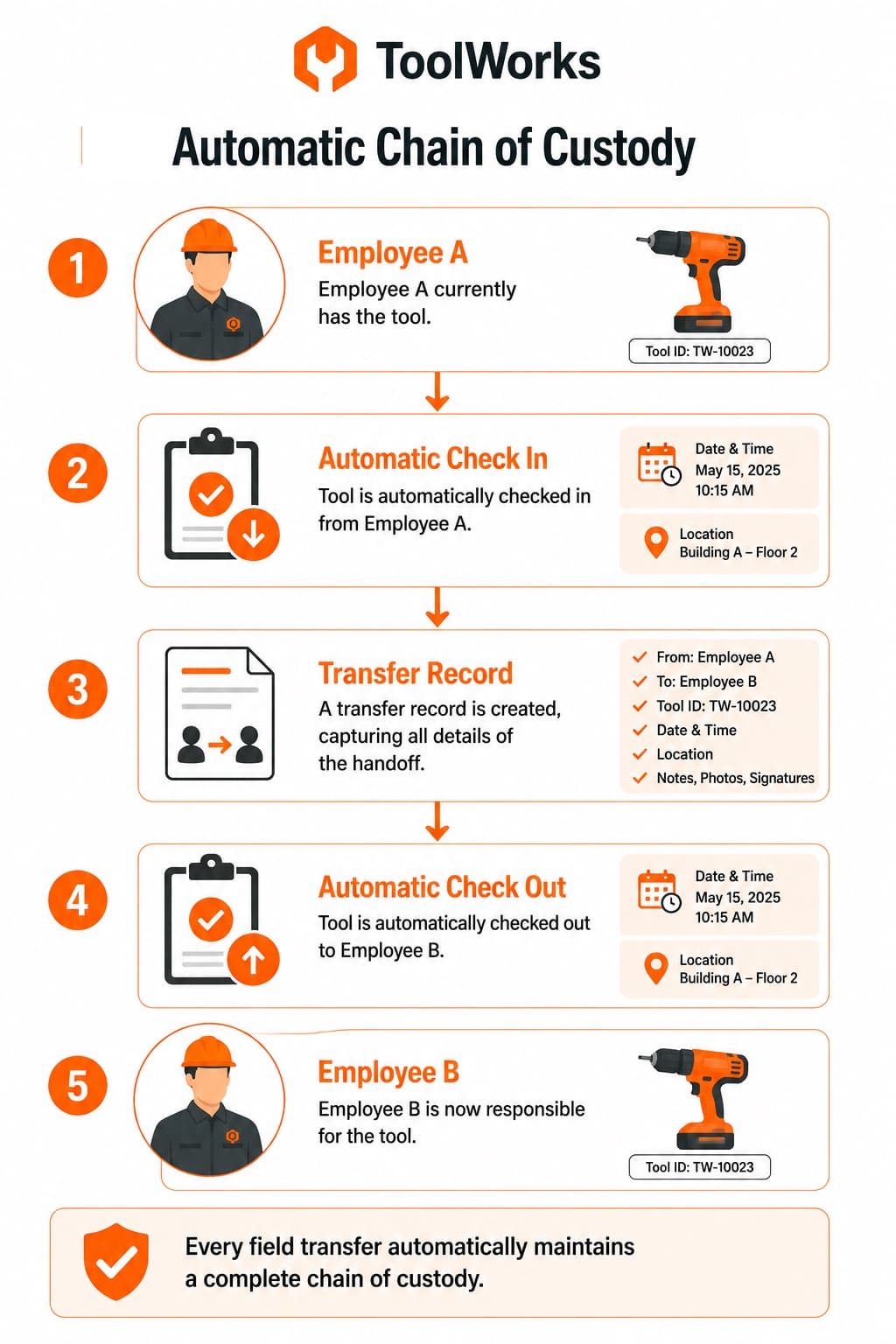
When a Field Transfer is approved, ToolWorks doesn't simply overwrite the assigned user.
Instead, it automatically performs two custody events:
- Checks the tool in from the current employee.
- Checks the tool out to the receiving employee.
Although users experience this as a single transfer, the system preserves an unbroken chain of custody.
Every movement becomes part of the permanent history.
This provides significantly better accountability for organizations that require detailed asset records.
Every field transfer automatically maintains a complete chain of custody.
Scan to Transfer in Seconds
Manual data entry slows field crews.
ToolWorks allows transfers to be completed by scanning barcodes or QR codes.
Warehouse staff can quickly assign multiple tools.
Field employees can scan equipment during transfers.
Receiving employees can immediately confirm receipt.
Scanning reduces mistakes while making transfers significantly faster than manual searches.
For organizations managing hundreds or thousands of assets, barcode and QR code workflows dramatically improve efficiency.
Built for Offline Field Work
Job sites do not always have reliable internet connectivity.
Many tool tracking systems become difficult or impossible to use once employees lose network access.
ToolWorks was designed with an offline-first architecture that allows employees to continue assigning, transferring, borrowing, and returning tools even without a connection.
Employees can:
- Scan tools.
- Complete Field Transfers.
- Accept assignments.
- Record chain of custody.
- Continue working normally.
Once connectivity returns, ToolWorks automatically synchronizes changes with the central database.
This allows organizations to maintain complete accountability regardless of network availability.
Beyond Hand Tools
Although many organizations begin by tracking hand tools, the same workflows apply to virtually any asset.
Organizations use ToolWorks to manage:
- Power tools
- Heavy equipment
- Test instruments
- Calibration equipment
- Ladders
- Generators
- Compressors
- Survey equipment
- Safety equipment
- PPE
- Rental equipment
- High-value assets
Regardless of asset type, every assignment and transfer follows the same consistent workflow.
Visibility Before You Request
Borrowing tools should not involve guesswork.
Before requesting equipment, employees can quickly determine:
- Who currently has it.
- Whether it is assigned.
- Where it is located.
- Whether it is available.
This visibility reduces unnecessary calls between crews and helps employees find the right equipment faster.
Push Notifications Keep Everyone Informed
When a transfer request or assignment requires action, ToolWorks immediately sends a push notification.
Employees receive requests in real time and can respond directly from the mobile app.
This helps reduce delays while ensuring requests are not overlooked.
Why Chain of Custody Matters
Many organizations focus only on knowing where a tool is today.
A more important question is:
Who was responsible for the tool yesterday?
Or last week?
Or before it disappeared?
Because ToolWorks records every assignment, return, and Field Transfer, organizations maintain a complete historical record of responsibility.
This improves:
- Accountability
- Loss investigations
- Internal audits
- Compliance
- Equipment utilization reporting
Rather than relying on verbal handoffs, every transfer becomes part of a permanent audit trail.
Comparing ToolWorks and ShareMyToolBox Workflows
Organizations evaluating ToolWorks alongside ShareMyToolBox often ask whether the same peer-to-peer borrowing workflows are available.
The answer is yes.
Employees can:
- Request tools from coworkers.
- Transfer tools directly between employees.
- Accept or decline transfers.
- Scan equipment during transfers.
- View who currently has each asset.
- Maintain complete transfer history.
In addition, ToolWorks extends these workflows to warehouse operations, allowing organizations to manage the complete lifecycle of every asset from initial assignment through field transfers and eventual return.
Rather than treating warehouse assignments and employee transfers as separate systems, ToolWorks manages both through a unified chain of custody.
Benefits for Field Teams
Organizations implementing digital transfer workflows typically experience benefits such as:
- Less time searching for equipment.
- Improved employee accountability.
- Fewer lost tools.
- Faster transfers.
- Better visibility.
- Simplified audits.
- Reduced paperwork.
- Improved inventory accuracy.
Perhaps most importantly, employees spend less time managing tools and more time completing productive work.
Frequently Asked Questions
Does ToolWorks support peer-to-peer tool transfers like ShareMyToolBox?
Yes. ToolWorks supports employee-to-employee Field Transfers, transfer requests, approvals, and complete transfer history.
Can employees request tools from coworkers?
Yes. Employees can search inventory, see who currently has a tool, and submit a Field Transfer Request.
Can employees transfer tools directly?
Yes. When employees are working together, one employee can initiate a Field Transfer and the receiving employee simply accepts or declines.
Does ToolWorks keep a complete transfer history?
Yes. Every assignment, transfer, return, confirmation, note, signature, and photo is recorded to maintain a complete audit trail.
Can warehouse assignments require employee confirmation?
Yes. Organizations can configure Tool Assignments to require employees to accept or decline receipt, creating a verifiable chain of custody.
Can transfers be completed offline?
Yes. ToolWorks' offline-first architecture allows employees to assign, transfer, borrow, and return equipment even without an internet connection. Changes automatically synchronize once connectivity is restored.
Can barcode and QR codes be used for transfers?
Yes. Employees can scan barcodes or QR codes to quickly identify and transfer equipment.
Can ToolWorks track more than tools?
Absolutely. Organizations also manage heavy equipment, test instruments, PPE, ladders, generators, calibration equipment, and many other asset types.
Simplify Tool Borrowing Without Losing Accountability
Borrowing equipment between employees should be fast, but it should never come at the expense of accountability.
ToolWorks combines the flexibility of peer-to-peer Field Transfers with warehouse assignments, configurable confirmations, barcode and QR code scanning, offline operation, and a complete chain of custody.
Whether a tool moves from the warehouse to an employee, from one technician to another, or back again, every handoff is recorded automatically so your organization always knows who is responsible for every asset.
If you're evaluating solutions such as ShareMyToolBox and want a platform that supports both peer-to-peer borrowing and complete enterprise asset accountability, ToolWorks provides a simple, intuitive workflow that scales from small field teams to large multi-site operations.
Start your free trial today and discover how ToolWorks helps your team spend less time tracking tools and more time getting the job done.