Know Every Piece of Safety Equipment Is Inspected. Prove It in Minutes.
ToolWorks gives industrial safety teams one place to track, inspect, and document the fire and safety equipment they own, across every facility, unit, and rig.
Start Tracking NowSound familiar?
- Inspection records live in spreadsheets, binders, and someone's truck
- A monthly check gets missed, and nobody knows until the auditor asks
- A failed inspection gets written down, but the fix never gets tracked
- You can't say with confidence who inspected what, or whether they were qualified to
- Pulling records for an OSHA visit or insurance review takes days
Keep your inspection program on schedule without chasing anyone
Preset inspection templates. Start with ready-made OSHA, ANSI and NFPA-based checklists for fire extinguishers, emergency egress, flammable storage, hot work, and more, then customize them to match your own program.
Automatic schedules and reminders. Assign inspections to any piece of equipment on the schedule you need: daily, weekly, monthly, or annually. ToolWorks sends reminders before they're due, and your dashboard shows what's past due, due now, and due soon.
Inspections in the field. Inspectors scan the equipment's QR code or barcode and complete the checklist on their phone, with pass/fail, photos, readings, and notes.
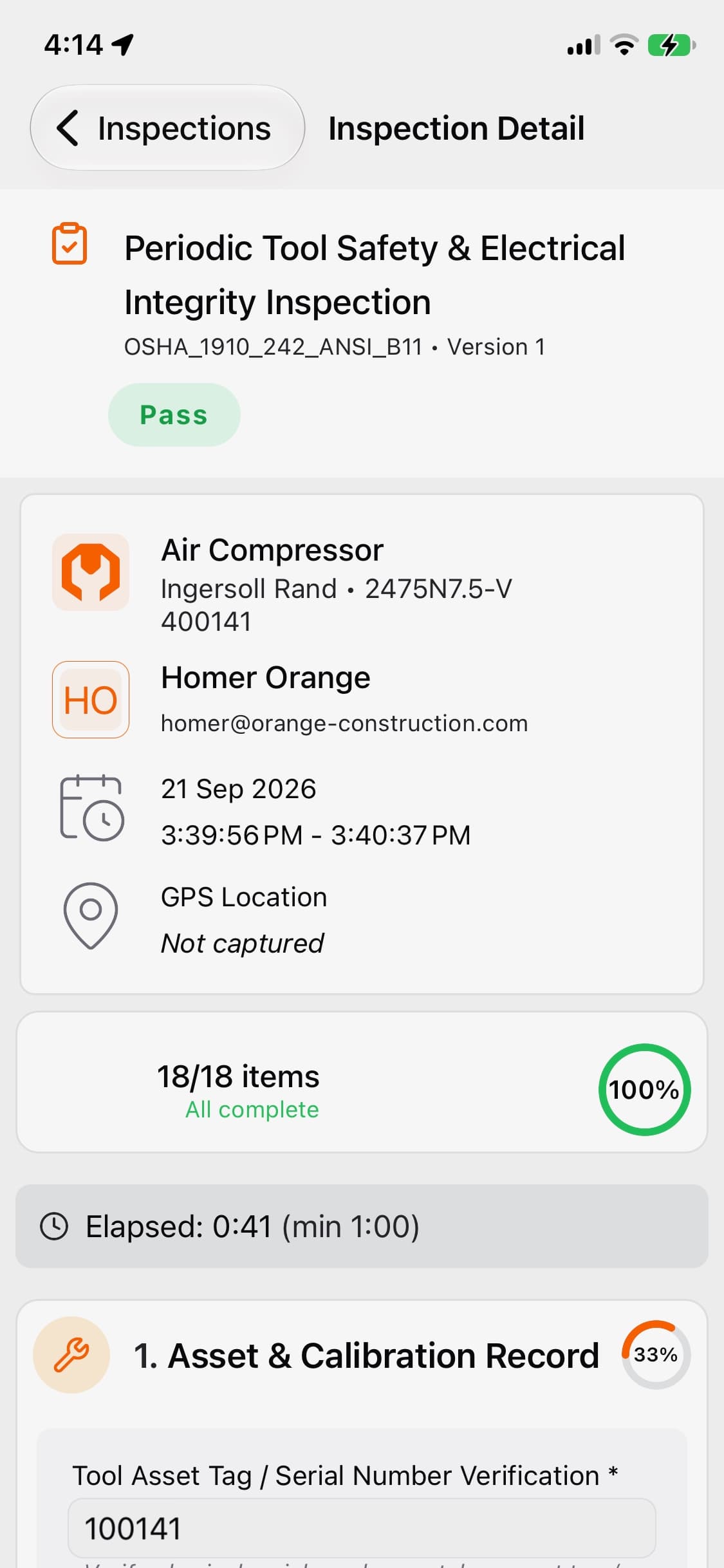
Close the loop on every failure
When an item fails, it doesn't just get written down. A failed inspection creates an issue and a work order tied to the exact equipment and the exact failed item, so repairs get tracked through to completion.
Know your inspectors are qualified
Define the training and certifications your program requires, and track who holds what and when it expires. ToolWorks can block an inspection by someone without the required credential, or allow it with an admin-documented reason, whichever fits your policy.
Be audit-ready any day of the year
Every inspection is time-stamped and attributed to the person who did it, with signatures. Generate a PDF or share a certificate by link, so insurers, auditors, and contractors can review results without needing an account. Equipment history stays in one place instead of scattered across files.
Built for how industrial sites are actually organized
Model your real structure, from company to region to facility to unit to area, with unlimited locations. Roll up compliance by site, region, or any grouping you choose, and control who sees what at each level.
What you can track
Fire extinguishers · Fall protection · Gas detectors · Respirators and SCBA · Eyewash and emergency showers · Ladders · Cranes and hoists · Emergency lighting and egress · Flammable storage · Lockout/tagout devices
Why safety teams choose ToolWorks
| Spreadsheets & binders | Enterprise CMMS / EHS suites | ToolWorks | |
|---|---|---|---|
| Inspection checklists | Manual | Often add-on | Built in, with presets |
| Setup time | None, but no reminders | Weeks to months | Days |
| Field use | Paper | Varies | Mobile app with scanning |
| Cost | "Free" until a miss | High | Unlimited assets, users, locations |
Trusted by industry leaders





Frequently asked questions
Does ToolWorks make us OSHA or NFPA compliant?
No software can do that on its own. ToolWorks helps you run and document your inspection program consistently, and keeps the records you need to show it. Your program and the requirements that apply to your sites remain yours to define.
Can we use our own checklists?
Yes. Start from a preset or build your own, including pass/fail, numeric readings, photos, and text items.
We have multiple facilities. Does that cost extra?
No. Assets, users, and locations are unlimited.
Can contractors or auditors see inspection results?
Yes. Share a signed certificate by link, no login required.
How do we get our existing equipment in?
Import from a spreadsheet, or use Snap To Add to photograph equipment and let ToolWorks fill in the details.