Introducing DVIR in ToolWorks
Complete Fleet Inspection and Compliance
Start Tracking NowDigital Vehicle Inspection Reports: A Critical Component of Fleet Safety
For any business operating a fleet of vehicles, pre-trip and post-trip inspections are not optional — they are a legal requirement. The Federal Motor Carrier Safety Administration (FMCSA) mandates that commercial motor vehicle drivers conduct thorough inspections before and after every trip, documenting the condition of critical safety components like brakes, lights, tires, and steering systems.
Yet despite these requirements, many fleet operators still rely on paper forms, clipboards, and filing cabinets. The result is predictable: incomplete records, illegible handwriting, lost documents, and — most critically — inspections that are rushed or skipped entirely. When a vehicle with a known defect causes an accident, the consequences extend far beyond regulatory fines. Lives are at stake.
ToolWorks now provides a complete solution for Digital Vehicle Inspection Reports (DVIR) — giving fleet operators, drivers, and safety managers the tools they need to ensure compliance, maintain vehicle safety, and create an auditable record of every inspection.
This release marks another major milestone in our ongoing effort to build comprehensive fleet management capabilities directly into ToolWorks. Following the introduction of Vehicle Management and Fuel Log Tracking, DVIR completes the core operational visibility that modern fleets require.

Why ToolWorks Built DVIR
The decision to add inspection capabilities came directly from customer feedback and real-world usage patterns.
Many ToolWorks customers were already using the platform to track tools and equipment loaded onto service trucks and vans. They needed a way to verify not just that the vehicle was safe to drive, but that the right tools were on board before heading to a job site.
This insight shaped our approach. Rather than building a standalone inspection app, we integrated DVIR directly into the ToolWorks platform — creating a unified workflow where vehicle safety checks and tool verification happen together, in one place.
The result is a system that solves two problems simultaneously: ensuring the truck is roadworthy and ensuring the tools are present.
The ToolWorks Advantage: Integrated Asset Verification
Most fleet inspection software treats the vehicle as an isolated asset. You inspect the truck, submit the report, and move on. But for service-oriented businesses — contractors, maintenance crews, field technicians — the vehicle is more than transportation. It is a mobile workshop carrying thousands of dollars in tools and equipment.
ToolWorks addresses this reality with integrated asset verification during inspections.
When a driver begins a pre-trip inspection, the system can include an Asset Inspection section that lists the high-value tools currently assigned to that vehicle. The driver verifies each item is present before hitting the road. If something is missing, it is documented immediately — not discovered hours later at a job site.
This capability is unique to ToolWorks. Competitors like Fleetio, Samsara, and similar fleet platforms focus exclusively on vehicle condition. They have no mechanism for tracking what is inside the vehicle. With ToolWorks, you get complete visibility: the vehicle, its condition, and its contents — all in one inspection workflow.
For Drivers: A Mobile-First Inspection Experience
Conducting inspections should be fast, intuitive, and impossible to skip. ToolWorks was designed with these principles in mind.
Starting an Inspection
Drivers can begin an inspection directly from the Dashboard. If a vehicle is assigned to them, pending inspections appear prominently with a single tap to start. Alternatively, drivers can scan a QR code on the vehicle or select from a list of nearby vehicles.
When the inspection begins, ToolWorks automatically captures the GPS location — providing verifiable proof that the inspection occurred at the vehicle's actual location.
Zone-Based Walk-Around Flow
Instead of presenting a long alphabetical list of 40 or 50 items, ToolWorks organizes inspections by physical zones that match the natural walk-around path: Driver Side, Front Exterior, Passenger Side, Rear, Cab Interior, Engine Compartment.
Each zone contains the specific items to check — tires, mirrors, lights, fluid levels — grouped logically so the driver can work through them efficiently.
Exception-Based Reporting
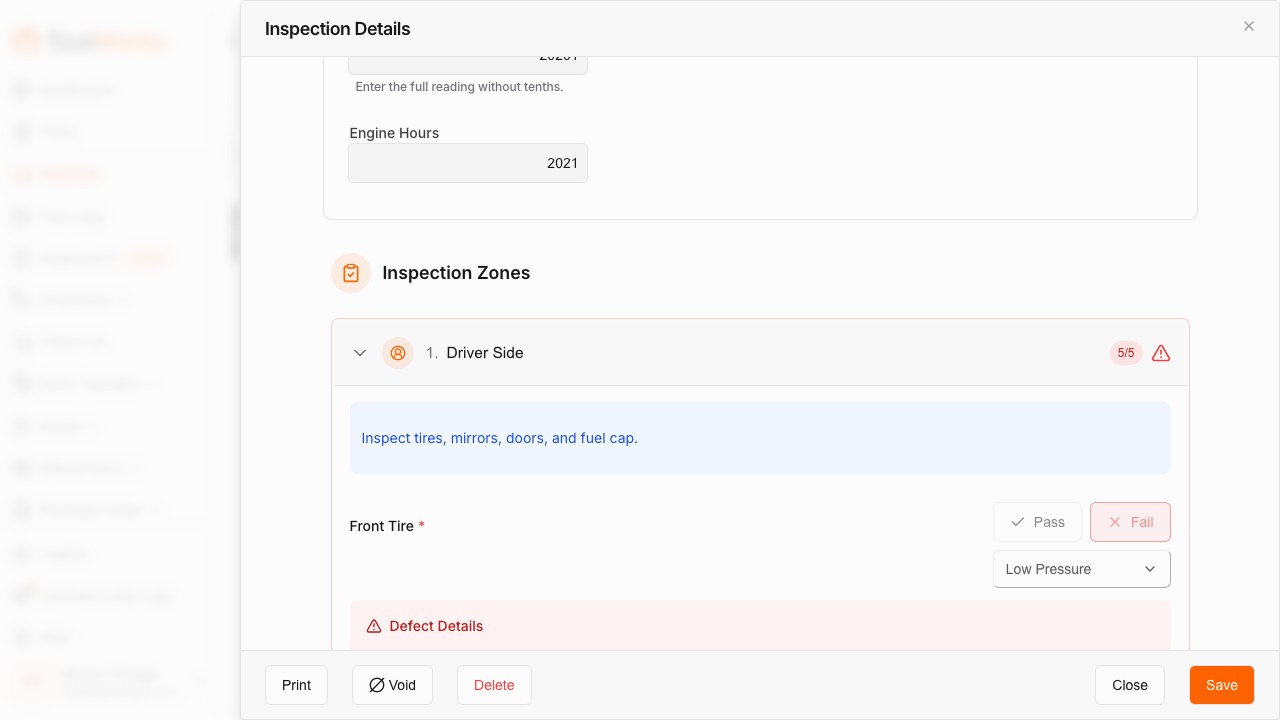
Here is where ToolWorks differs from traditional inspection forms. Items default to Pass. The driver only needs to tap an item if it fails.
This approach dramatically speeds up the inspection process while reducing the risk of "pencil whipping" — the common practice of mindlessly checking every box without actually looking. When everything requires a tap, drivers tune out. When only problems require action, attention stays focused on identifying actual defects.
Documenting Failures
When a driver marks an item as failed, ToolWorks prompts for the required documentation:
- Severity Level — Is this a minor issue that allows continued operation, or a major safety defect that takes the vehicle out of service?
- Failure Reason — Select from pre-defined options for consistency (e.g., "Low tread depth," "Bulb burned out," "Fluid leak detected").
- Photo Evidence — Capture a photo of the defect directly within the app.
- Comments — Add additional context or notes.
Administrators can configure which items require photos and comments when failed, ensuring critical defects are always properly documented.
Signature and Certification
Every inspection concludes with a driver sign-off. The driver reviews the overall status, provides a digital signature, and confirms that the inspection is accurate and complete. This signature serves as the legal certification required by FMCSA regulations.
For Administrators: Building Custom Checklists
Not every vehicle requires the same inspection. A box truck has different safety-critical components than a pickup. A refrigerated trailer requires temperature checks. A crane truck needs outrigger inspections.
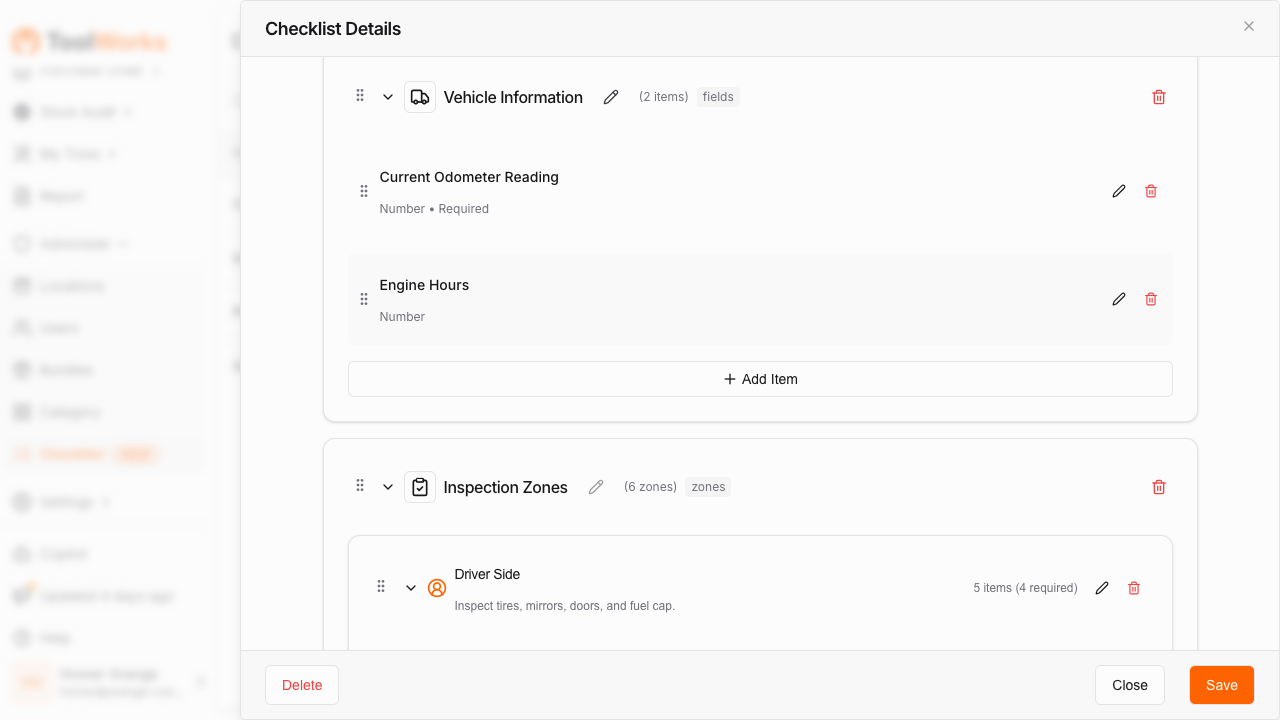
ToolWorks provides a drag-and-drop Checklist Builder that gives administrators complete control over inspection templates.
Checklist Types
Start with one of four pre-built templates:
- Standard DVIR — Complete pre/post-trip inspection with vehicle information, inspection zones, asset verification, and driver sign-off.
- Event/Incident Report — Document accidents or incidents with date/time, photos, notes, and drivability assessment.
- Safety Checklist — Quick spot-checks without the full DVIR workflow.
- Blank Checklist — Build entirely from scratch for unique requirements.
Zones and Items
Add pre-configured zones like Driver Side, Front Exterior, Engine Compartment, or create custom zones specific to your equipment. Within each zone, add individual inspection items — each configurable with its own failure settings.
ToolWorks supports 12 different input types including Pass/Fail toggles, photo uploads, signature capture, number fields, text input, date/time pickers, and more. This flexibility allows you to build inspections that match your exact operational requirements.
Failure Configuration
For each inspection item, administrators can configure:
- Whether photos are required on failure
- Whether comments are required on failure
- Pre-defined failure reasons to choose from
- Severity levels (minor vs. major/out-of-service)
This ensures that when something fails, the documentation captured is consistent and complete.
Assignment and Scheduling
Checklists can be assigned to specific vehicles, vehicle types, or your entire fleet. Set up recurring schedules so pre-trip inspections are required daily, weekly, or at custom intervals. ToolWorks tracks compliance and shows which vehicles have pending or overdue inspections.
Smart Compliance Features
Beyond the basic inspection workflow, ToolWorks includes several features designed to ensure inspections are conducted properly and that safety issues are addressed immediately.
Out of Service Flagging
When a driver marks a defect with Major severity, the vehicle is automatically flagged as Out of Service. This status is visible across the platform — on the vehicle record, in the fleet dashboard, and in reports. The vehicle cannot be marked safe until the issue is resolved and verified.
Minimum Duration Enforcement
Rushing through a 50-item inspection in 30 seconds is a clear sign that something is wrong. ToolWorks allows administrators to set a minimum inspection duration — a configurable time threshold that must elapse before the inspection can be submitted. If a driver attempts to submit too quickly, the system flags the inspection for review.
Push Notifications on Critical Failures
When a driver reports a major safety defect, fleet managers and safety officers receive an immediate push notification. There is no waiting for someone to check a dashboard or review reports at the end of the day. Critical issues are communicated in real time, enabling rapid response.
GPS and Timestamp Verification
Every inspection captures the GPS coordinates and timestamp automatically. This creates a verifiable record that the inspection occurred at the expected location and time — essential for compliance audits and liability protection.
Closed-Loop Maintenance Workflow
Identifying a defect is only the first step. What matters is ensuring it gets fixed — and that the fix is verified before the vehicle returns to service.
ToolWorks supports a closed-loop maintenance workflow:
- Driver reports issue — "Left taillight broken" during post-trip inspection.
- Fleet manager notified — Alert appears in the defect inbox.
- Work order created — Manager converts the defect into a maintenance work order.
- Mechanic completes repair — Work order marked as complete with repair notes.
- Driver verifies fix — The next time a driver opens that vehicle's inspection, they see a prompt: "Previous inspection reported 'Left taillight broken'. Has this been resolved?" The driver confirms the repair to close the loop.
This workflow ensures nothing falls through the cracks. Every reported defect has a clear resolution path.
AI-Powered Photo Analysis: Coming Soon
We are actively developing AI Vision capabilities for vehicle inspections. In an upcoming release, drivers will be able to take a photo of an inspection item — a tire, a brake light, a fluid level — and receive an automatic pass/fail suggestion based on image analysis.
This technology builds on the AI Vision we already offer for fuel receipt scanning, extending intelligent automation into the inspection workflow. The goal is simple: make it even easier for drivers to conduct thorough inspections without adding friction to their day.
Stay tuned for announcements as this capability becomes available.
Compliance-Ready Reporting
Every inspection generates a complete, auditable record that can be exported as a PDF report. These reports include:
- Vehicle identification and odometer reading
- Driver name and signature
- Date, time, and GPS location
- Every inspection item with its status
- Photos and comments for failed items
- Overall pass/fail determination
Reports can be generated on demand or scheduled automatically. The inspection history is fully searchable, allowing fleet managers to quickly locate records during audits or investigations.
Administrators can also review and approve submitted inspections, adding an additional layer of oversight. The review workflow supports Draft, Submitted, Reviewed, and Voided statuses — providing complete lifecycle management for every inspection record.
Key Benefits at a Glance
For Drivers:
- Fast, intuitive mobile interface designed for gloved hands and field conditions
- Zone-based walk-around flow matches the natural inspection path
- Exception-based input — only tap items that fail
- Voice-to-text for comments (no typing required)
- Works offline and syncs when connection returns
For Fleet Managers:
- Customizable checklists for every vehicle type
- Real-time notifications on critical failures
- Complete visibility into inspection compliance across the fleet
- Closed-loop workflow from defect to repair to verification
For Safety and Compliance:
- FMCSA-compliant DVIR documentation
- GPS and timestamp verification
- Minimum duration enforcement to prevent rushed inspections
- PDF exports for audits and record-keeping
- Out of Service flagging for major defects
The ToolWorks Difference:
- Integrated asset verification — confirm tools are on board during inspections
- Unified platform for tools, equipment, vehicles, and inspections
- No switching between apps or systems
The Bottom Line
Vehicle inspections are a legal requirement — but more importantly, they are a safety imperative. Every skipped inspection, every overlooked defect, every missing document represents a risk that no business should accept.
ToolWorks DVIR gives you the tools to ensure every vehicle is inspected properly, every defect is documented and resolved, and every record is available when you need it. Combined with our unique asset verification capability, you get visibility that no other platform offers: the vehicle, its condition, and its contents — all in one place.
If you are already using ToolWorks for tool and equipment tracking, adding DVIR to your workflow is seamless. If you are evaluating fleet management solutions, we invite you to see how ToolWorks provides comprehensive operational visibility in a single, unified platform.
Ready to simplify fleet inspections and ensure compliance? Start your free trial today, or explore our detailed guides for Inspections and Checklists to learn more.