Introducing the New ToolWorks Mobile Experience
Offline Tool Tracking Made Faster and Simpler
Start Tracking NowManaging tools in the field isn't always easy. Whether you're working in a manufacturing facility, warehouse, plumbing business, or on a busy job site, you need quick access to information, reliable performance, and the confidence that your tool records remain accurate, even when internet connectivity doesn't.
That's why we've spent the last several months reimagining the ToolWorks mobile experience from the ground up.
Today, we're excited to introduce one of the biggest updates ever to the ToolWorks mobile app. Available now on both iOS and Android in version 3.1.75, this release delivers a completely redesigned interface, significantly improved performance, and our new offline-first architecture that allows you to continue working even when you're disconnected from the internet.
More than a visual refresh, this update changes how ToolWorks works behind the scenes. The result is a mobile app that's faster, easier to navigate, and better suited for the environments where real work gets done.
Designed Around Your Daily Workflow
When you're managing tools throughout the day, every second counts. You shouldn't have to tap through multiple screens just to see what needs your attention.
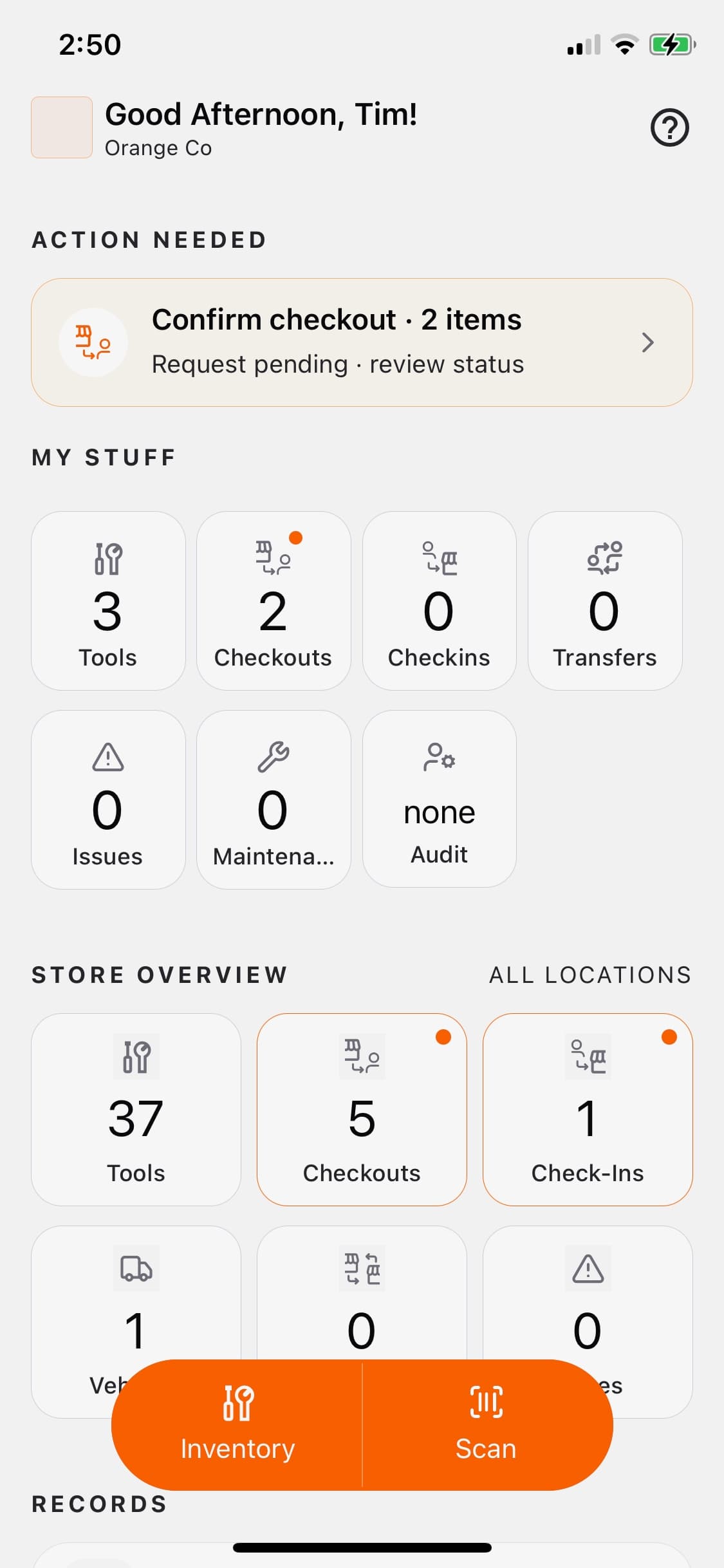
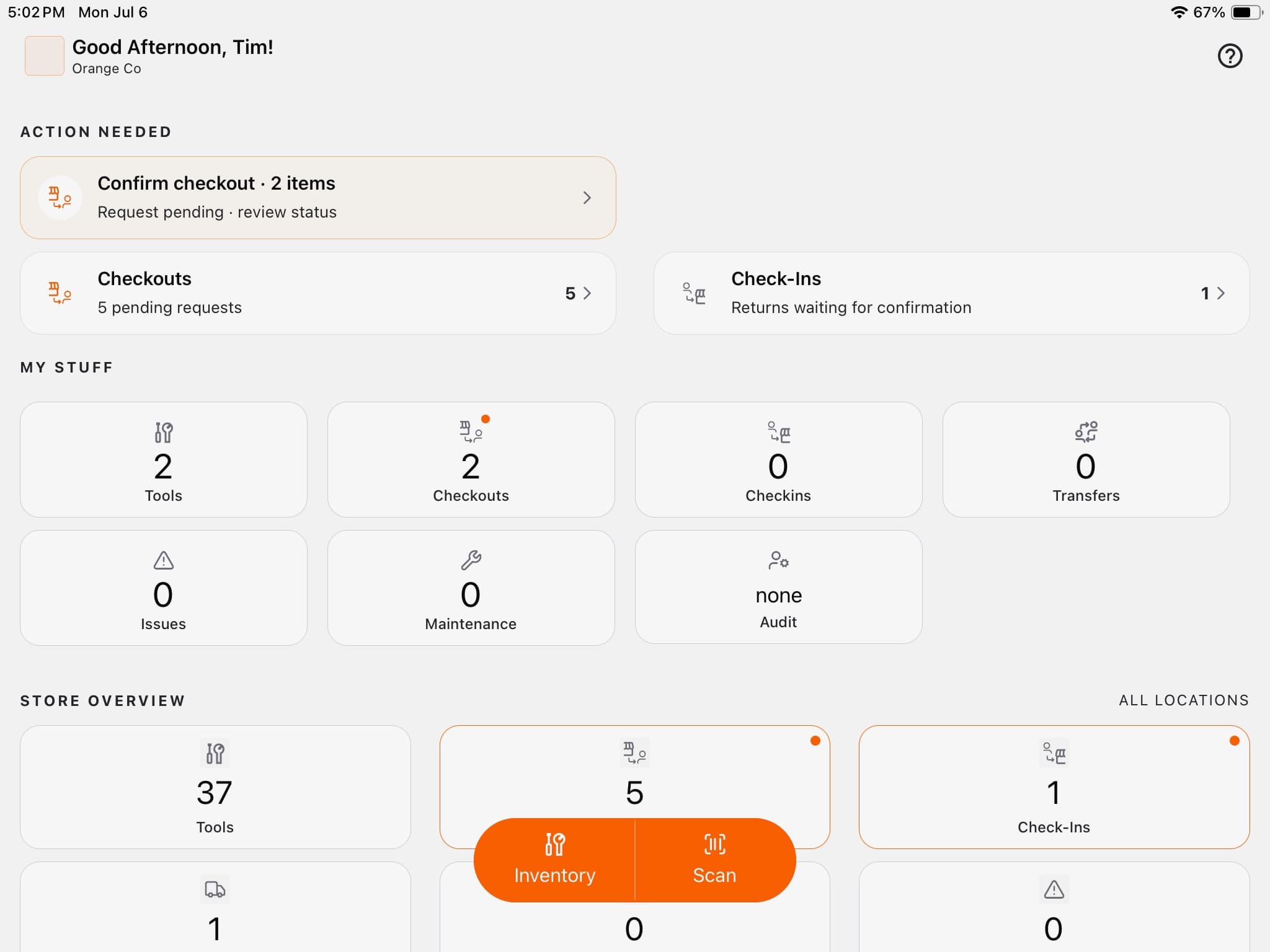
The new ToolWorks Home page has been redesigned around the information users need most frequently, helping you start your day with everything important in one place.
Instead of navigating through different modules to find pending work, the Home page now organizes your information into dedicated sections that guide your workflow.
Action Needed
Stay on top of today's priorities with quick visibility into pending check-ins, checkouts, approvals, confirmations, and other tasks that require your attention.
Rather than searching through different modules, you immediately know what needs to be completed.
My Stuff
Quickly access the tools and assets you're responsible for, including checked-out tools, reservations, and other records that relate directly to you.
This personalized view makes it much easier to stay organized throughout the day.
Store Overview
Gain a clear picture of your inventory without navigating through multiple screens.
The Store Overview provides quick insight into tool availability and inventory status, helping store managers and supervisors make informed decisions faster.
Records
Maintenance history, inspections, audits, fuel logs, and other related records are now easier to reach, giving users faster access to the information they need to keep operations running smoothly.
Administration
Administrative users continue to have convenient access to the management features they rely on every day.
The result is a Home page that works with your daily workflow instead of making you work around the software.
Faster Navigation with Fewer Taps
One of our primary goals during this redesign was to reduce the amount of navigation required throughout the app.
Many of the actions users perform every day, such as finding a tool, scanning a barcode, or checking tool information, now require fewer taps than before.
Inventory and Scan Are Always Within Reach
We replaced the traditional bottom navigation with a streamlined action bar that keeps the two most frequently used features, Inventory and Scan, just one tap away.
Whether you're searching for a tool or scanning barcodes throughout the day, these core functions are always immediately accessible.
It's a simple change that significantly improves everyday usability.
One Unified Experience for Inventory and Scanning
In previous versions of ToolWorks, selecting tools from Inventory and scanning tools followed slightly different workflows.
We've now unified these experiences.
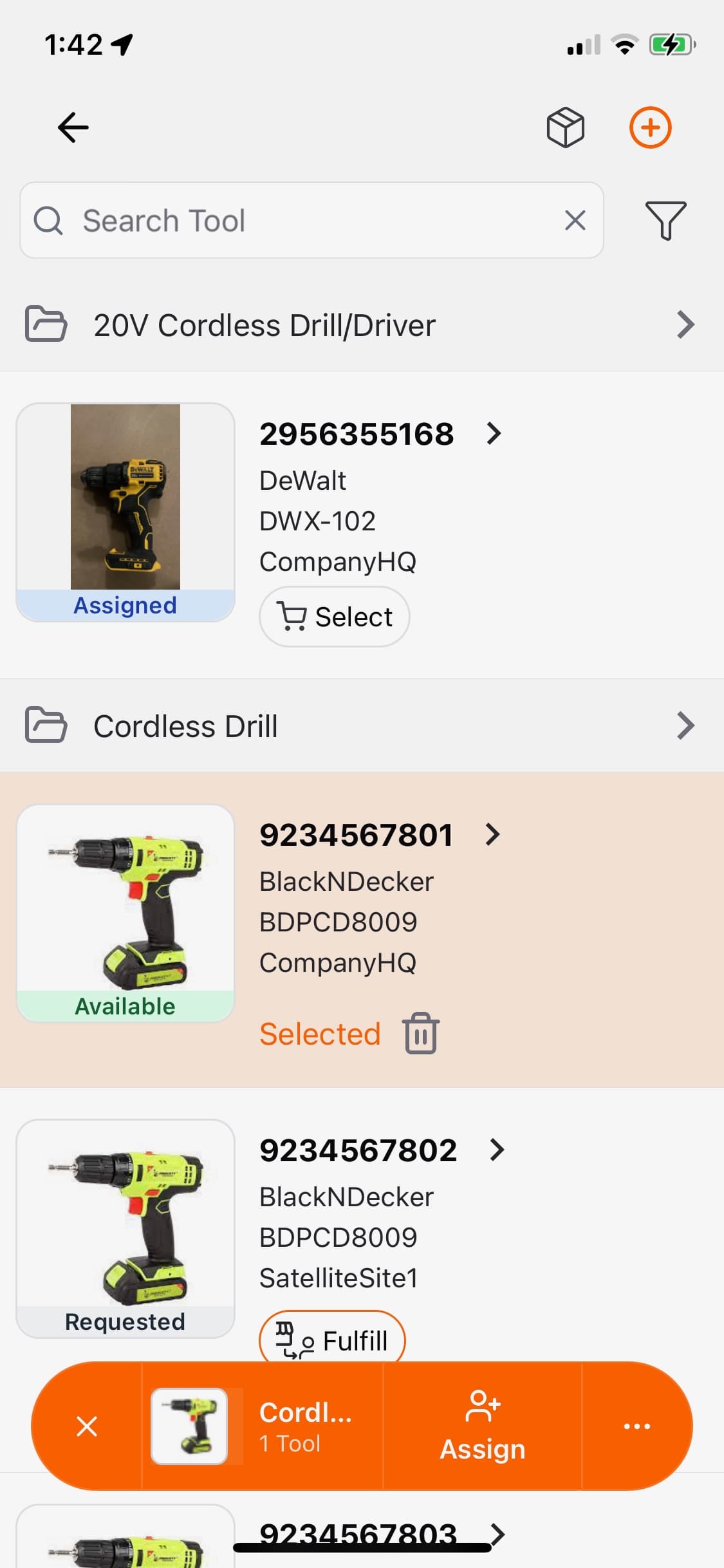
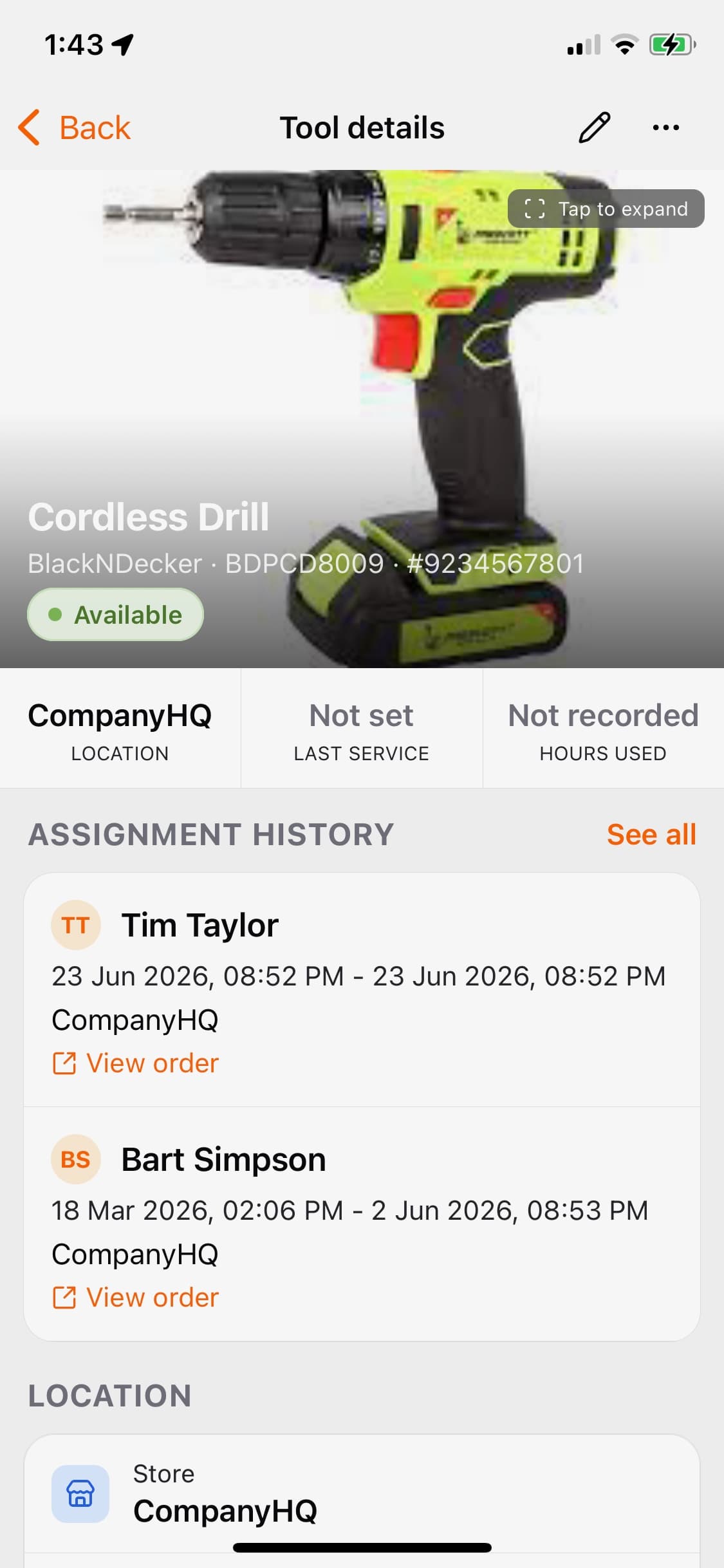
Whether you select a tool from Inventory or scan its barcode, you'll interact with the same action bar, creating a more consistent and intuitive experience throughout the app.
The new action bar includes four simple components:
- Clear to remove the current selection.
- Selected Tools showing the last selected tool, its photo, and the total number of selected items.
- Quick Action, providing immediate access to the action you're most likely to perform next.
- Additional Actions, giving you access to every other available operation when needed.
This approach allows common tasks to be completed faster while keeping advanced functionality easily accessible without cluttering the interface.
Richer Tool Information in One Place
Finding information about a tool should never require opening multiple screens.
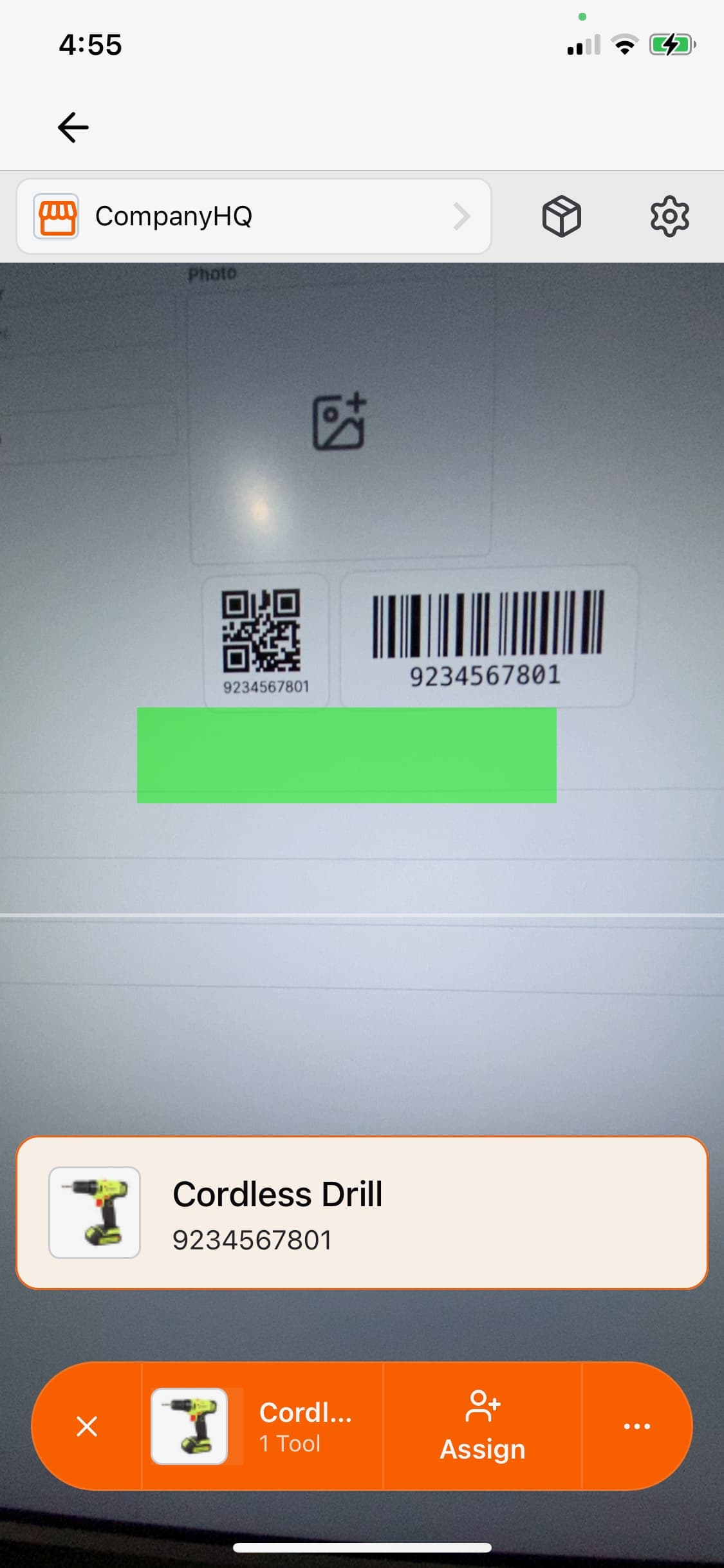
ToolWorks now presents a comprehensive tool details page that brings together the information users need most frequently.
From one screen you can quickly review tool information, related records, maintenance history, and other important details, helping you make better decisions without interrupting your workflow.
Vehicle records have also received similar improvements, providing a consistent experience across different asset types.
Better Visibility Across Every Location
As ToolWorks continues to evolve, we're moving toward a more unified inventory experience.
Instead of working within individual location views, we're gradually introducing an All Locations approach across the application.
This gives users a broader view of inventory availability throughout their organization, making it easier to locate tools, understand availability, and manage assets regardless of where they're currently stored.
For organizations with multiple stores, warehouses, or job sites, this provides greater visibility while reducing unnecessary navigation.
Built for the Real World with Offline-First Technology
The most significant improvement in this release isn't something you'll immediately see.
It's what powers the app behind the scenes.
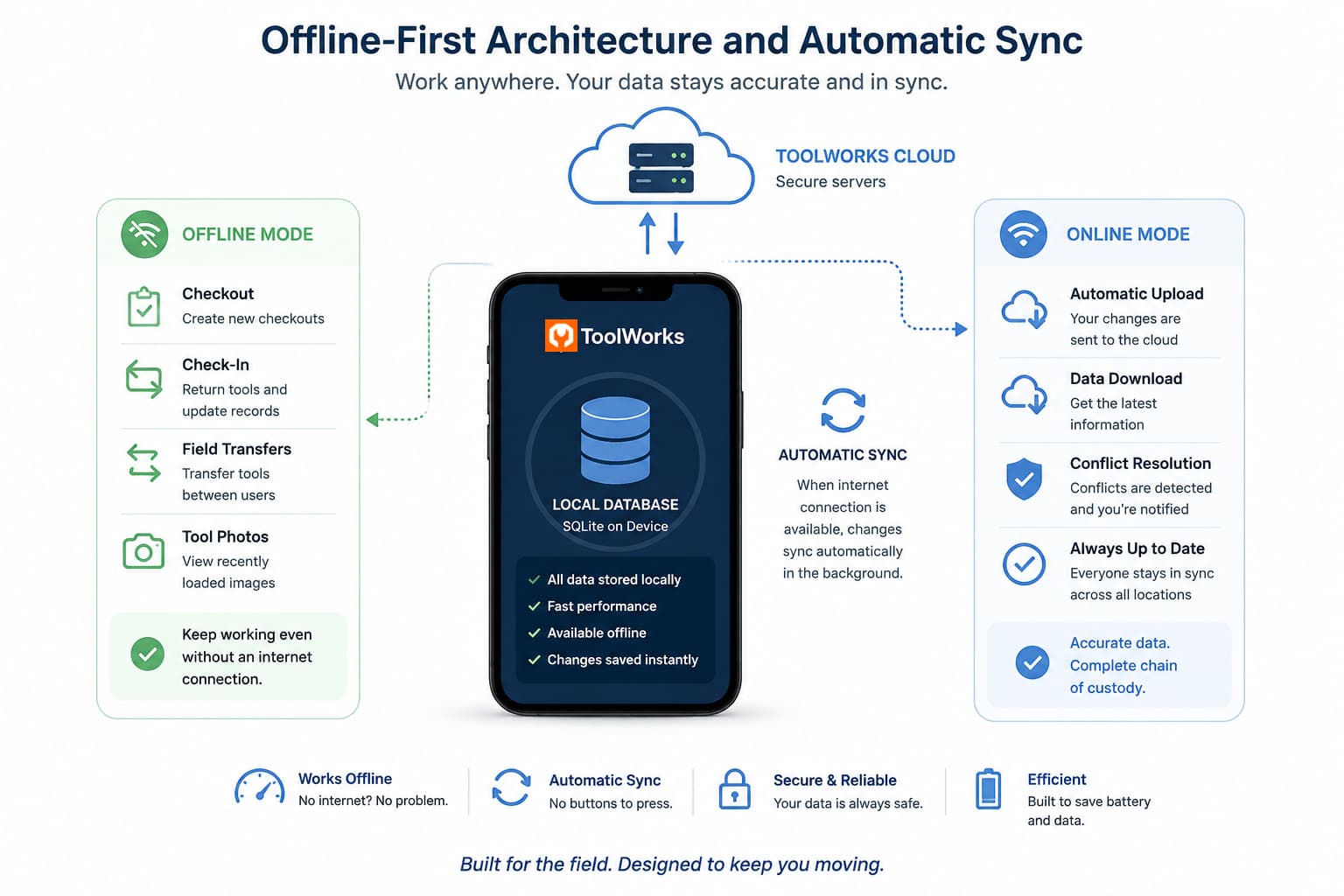
We've transitioned ToolWorks Mobile to a new offline-first architecture.
Instead of relying on an internet connection to retrieve information every time you open a screen, ToolWorks now maintains a local database on your device.
This means most information is available instantly, dramatically reducing loading times while allowing you to continue working even when internet connectivity is unavailable.
A Faster Experience Everywhere
Because information is now retrieved from the device instead of waiting for repeated server requests, the app feels noticeably faster throughout.
You'll experience:
- Faster screen transitions.
- Minimal loading indicators.
- More responsive searches.
- Quicker access to inventory.
- Smoother navigation throughout the app.
These improvements benefit every user, even those who are always connected to the internet.
Continue Working Without an Internet Connection
Many ToolWorks customers work where internet access isn't always reliable.
Whether you're inside a manufacturing plant, working in a warehouse, servicing customers as a plumbing contractor, or operating at remote facilities, connectivity shouldn't prevent you from tracking your tools.
The new offline-first architecture allows ToolWorks to continue operating even when your device loses its connection.
Current offline support includes:
- Checkout
- Check-In
- Field Transfers between users
We're already working to expand offline support to additional workflows in future releases.
Automatic Synchronization
Offline functionality should be effortless.
That's why ToolWorks automatically synchronizes your changes whenever internet connectivity becomes available again.
There's no Sync button to remember.
No manual uploads.
Simply continue working as usual.
When your device reconnects, ToolWorks automatically uploads your changes and keeps your inventory up to date.
In the rare event that changes cannot be synchronized automatically because another user modified the same information, ToolWorks alerts you so the conflict can be resolved without compromising your inventory records.
This allows us to maintain accurate chain of custody while making offline work as seamless as possible.
Tool Photos Available Offline
The new mobile experience doesn't just store your inventory information locally.
As you browse tools, ToolWorks also saves thumbnail images on your device.
This means previously viewed tool photos remain available while working offline, making it easier to identify equipment even without internet access.
It's another small improvement that contributes to a smoother field experience.
An Improved Experience on Tablets
Many organizations rely on tablets throughout their operations.
With this release, we've also improved the tablet experience by making better use of larger displays.
Updated layouts, including multi-column views where appropriate, allow users to view more information at once and navigate more efficiently without sacrificing the simplicity of the mobile experience.
Whether you're using an iPhone, Android phone, iPad, or Android tablet, ToolWorks now feels more at home on every device.
This Is Only the Beginning
While this release represents one of the biggest milestones in ToolWorks Mobile, it's also the foundation for everything coming next.
Over the coming months, we'll continue expanding offline functionality across additional workflows, redesign more areas of the application, further improve tablet support, and continue making the app even faster and easier to use.
Much of this work is driven directly by feedback from our customers, and we're grateful to everyone who has shared ideas, suggestions, and feature requests.
If you experience any issues with the new mobile experience, you can temporarily switch back to the previous interface by opening your Profile in the app and disabling New UI and Offline Mode while we continue refining the experience.
Update Today
The new ToolWorks Mobile experience is available now for iOS and Android in version 3.1.75.
We encourage all customers to update to the latest version and explore the new interface, improved performance, and offline capabilities.
Start Your Free Trial and experience the new ToolWorks Mobile app today.